Constraint
Architecture discussions need an inspectable view of infrastructure without making cloud access or code execution a prerequisite.
Generate local AWS and Azure diagrams from Pulumi or Terraform/OpenTofu, then carry the same architecture into editable diagrams, images, and documentation.
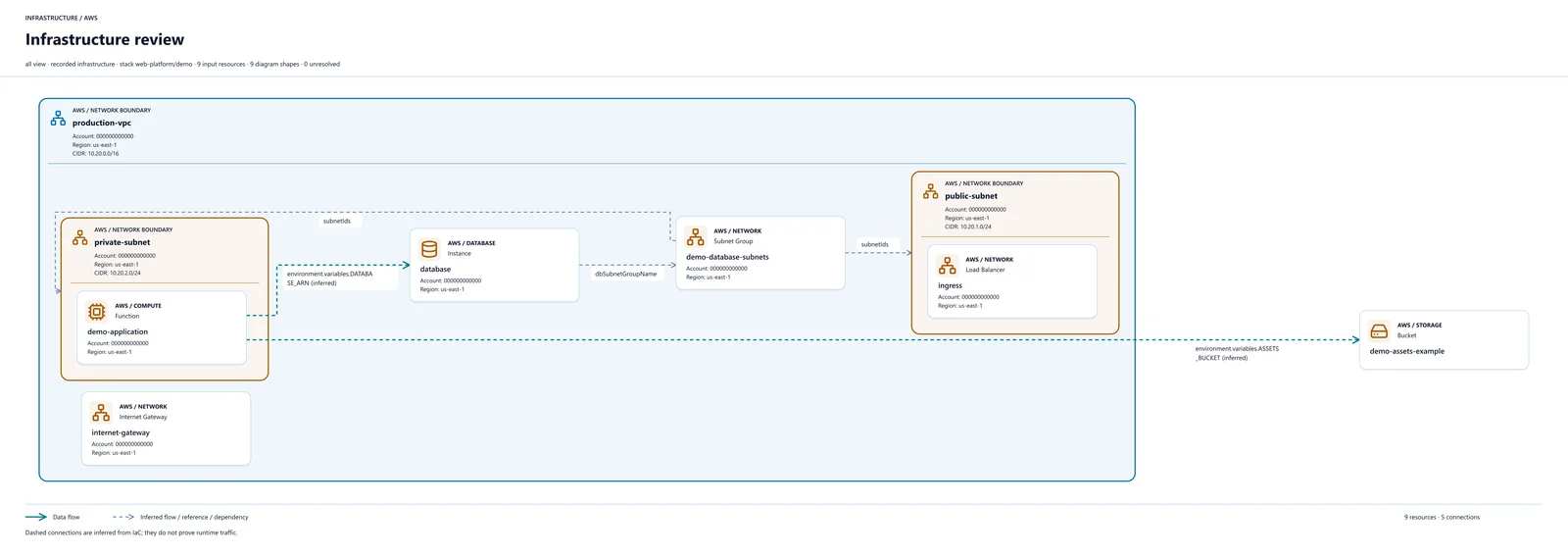
SwitchCase Infrastructure reads Pulumi source and stack exports, Terraform/OpenTofu HCL, and state or plan JSON. It turns those inputs into diagrams with nested network boundaries, resource labels, and connectors, alongside documentation a team can review.
The public release is a version 1.0.0 command-line package, not a desktop application. Static file analysis runs locally without executing infrastructure. Templates help focus the output on the architecture question at hand, and editable draw.io files leave room for a human to refine the presentation.
Architecture discussions need an inspectable view of infrastructure without making cloud access or code execution a prerequisite.
Read local files with a static-analysis workflow, generate several output formats, and keep cloud stack acquisition and preview execution explicit.
A static diagram is limited by the supplied files and what the parser can resolve. It is not a live inventory or proof of deployed state, so diagnostics and source review still matter.
Editable exports keep the result useful beyond generation, while the source files and diagnostics give reviewers a way to check what the picture represents.
Point the CLI at a project, source files, or exported state. The bundled AWS and Azure examples let you try generation without a cloud account.
Choose a template and review the network boundaries, resource labels, connections, and diagnostics against the input files.
Export editable draw.io, SVG, PNG, JPEG, PDF, Markdown, or JSON/XML. Review private infrastructure details before sharing.
The public download is the Node.js CLI archive. It does not include a Windows executable, macOS app, or Linux desktop binary. Use Node.js 22+ and npm to install it following the download page instructions.
Not for the bundled static examples. Installation requires internet access for npm dependencies. Pulumi stack acquisition or explicitly enabled preview execution requires the Pulumi CLI and the relevant backend or cloud authentication.
Static parsing does not execute or deploy infrastructure. Preview execution is opt-in; review its permissions and effects before enabling it. A generated diagram describes the supplied inputs, not a guarantee of the current deployed environment.
Yes. Use the draw.io export to edit shapes and connectors, or share image, PDF, and documentation exports. Review outputs first: infrastructure names, identifiers, addresses, and labels can reveal private information even when secret values are omitted.
The public CLI uses neutral Lucide icons for AWS resources and bundled architecture icons for Azure. AWS resource mapping and service names are preserved. Some source-build documentation screenshots use different artwork; bundled assets retain their own license notices.
The next move
SwitchCase can help uncover the structure of an existing system, make dependencies visible, and shape a practical modernization plan.