Constraint
A schema diagram is most useful when it stays in step with the code that defines it, and sketching one should not require an account.
A free, local-first database diagram editor: write DBML or import SQL, get a live ER diagram, edit it visually, and export DBML, SQL, images, or JSON Schema—without an account.
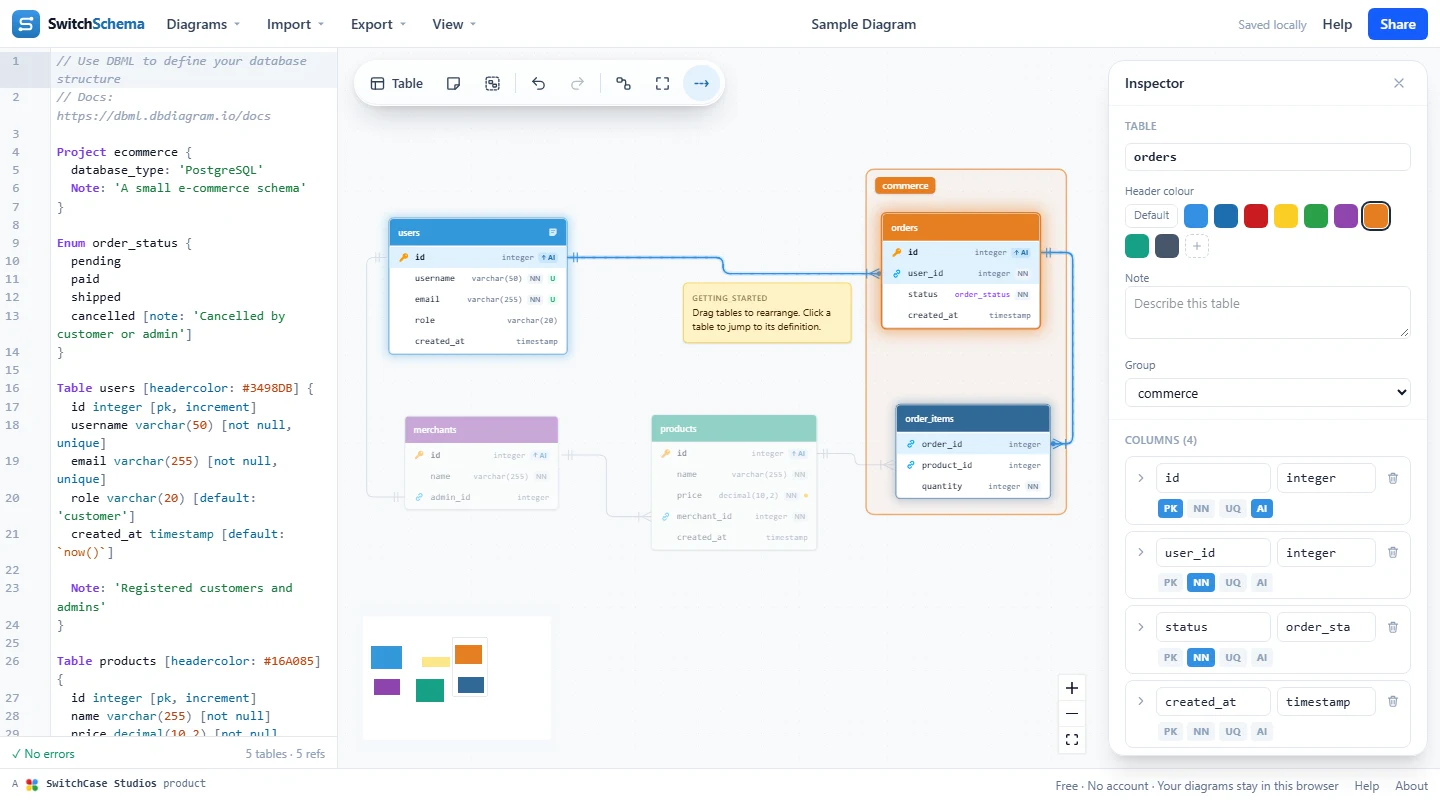
SwitchCase Schemas is a free database diagram editor that runs in the browser. Write DBML on the left and a live entity-relationship diagram appears on the right, with primary keys, not-null and unique badges, enums, notes, table groups, and crow’s-foot relationships. It uses the same open-source DBML parser as dbdiagram.io, by Holistics, so DBML files move between the two unchanged.
It is local-first: there is no account, and diagrams are saved in your browser’s local storage rather than uploaded to a server. Visual edits are written back into the DBML as targeted changes that keep your comments and formatting, so the text stays the source of truth. SwitchCase Schemas is not affiliated with dbdiagram.io or Holistics.
A schema diagram is most useful when it stays in step with the code that defines it, and sketching one should not require an account.
DBML stays the source of truth: canvas edits are written back into it as targeted changes that keep comments, and diagrams are saved in the browser’s local storage instead of on a server.
Without an account there is no sync or shared workspace. Diagrams stay in one browser until you export them, and a share link opens a copy rather than a live, shared document.
Plain-text DBML keeps the diagram portable: files move between SwitchCase Schemas and dbdiagram.io unchanged, and an exported file can sit in version control beside the code.
Type DBML with highlighting and inline errors, or import PostgreSQL, MySQL, SQL Server, Oracle, Snowflake, Rails schema.rb, or DBML JSON. The diagram updates as you go.
Select a table to edit it in the Inspector, or drag between columns to relate them. Each change lands in the DBML as a targeted edit that keeps your comments.
Export DBML, SQL, JSON, PNG, SVG, or PDF, or a JSON Schema for each table. A share link carries the whole diagram, compressed, in the URL.
Yes. SwitchCase Schemas is an owned product from SwitchCase Studios: a free, local-first database diagram editor. It is not affiliated with dbdiagram.io or Holistics.
Yes. SwitchCase Schemas uses the same open-source DBML parser by Holistics and stores DBML exactly as you wrote it, so files move between SwitchCase Schemas and dbdiagram.io unchanged. Table positions are not part of DBML, so imported diagrams are auto-arranged.
In your browser’s local storage. There is no account and diagrams are not uploaded to a server, so they do not sync between browsers or devices, and clearing site data removes them. Export DBML to keep a copy.
A share link carries the whole diagram, compressed, in the URL. Opening it creates a copy in the recipient’s browser; later changes on either side are not synced. Anyone with the link can read the diagram, so share it only with intended recipients.
For each table, SwitchCase Schemas generates a JSON Schema (draft 2020-12) with sample create payloads and full rows, shown in the Inspector and available as an all-tables export.
The next move
SwitchCase can help turn a tangled data model or legacy system into something a team can inspect, discuss, and change with confidence.